If you have ever been tasked with collating and printing student reports and certificates, you will know what a massive undertaking it really is!
We want each certificate to look presentable and reports to be personalised. A pet peeve for me is when names are capitalised, or not, like this:
jimmy JONES
It’s made worse when there are leading, trailing and extra spaces:
jimmy JONES
Not a good look, is it?
Here’s a generator which automatically trims leading, trailing and extras spaces, and capitalises the first letter of each word and sets all other letters as lower case.
You can download the Trim and Capitalise generator here: Trim and capitalise generator
Type/paste your data into the grid under Enter your data here:
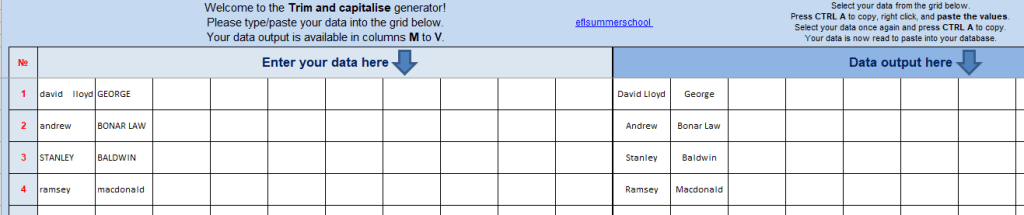
Select your data from the grid under Data output here. Press CTRL A on your keyboard to copy, right click, and paste the values:
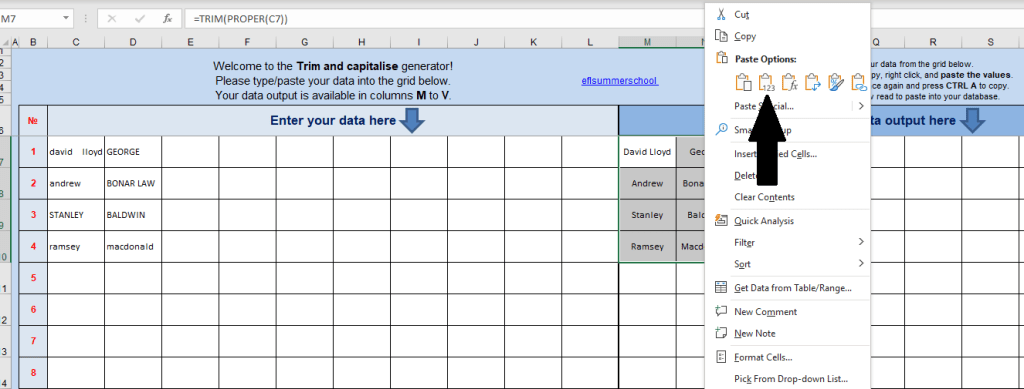
Select your data once again and press CTRL A to copy and paste the data into your database.

Looking for more office tools? You may be interested in these: Office tools
 EFL Summer School
Reblogged this on More than Teaching.
LikeLike